Create a printed booklet that documents the work of this class.
UPLOAD BOOKLET DRAFTS





A printed magazine or portfolio changes the nature of digital images. It takes them out of isolation in the computer screen and places them in proximity to each other in a sequence. Our relationship to a printed page is different and printing presents challenges of optimizing the image to the printing device. In this assignment you will assemble a magazine that showcases your work creatively.
01
Organize your Files
Watch this 9 minute and 19 second video about how to organize your files before building your InDesign document. Things to remember:
- Put source .PSD files in a PSD folder
- Keep exported .jpg / .png / .pdf in a folder called EXPORTS
- Put any original source photos used in your projects in a SOURCES folder
If you do not have .jpgs for all .PSD files then open each one up and export the .jpgs into the EXPORTS folder.
It is important to organize your files before bringing them into inDesign because inDesign creates links to the files. If files are move after your start your books the links will break.
02
Use a square 8″ x 8″ Format

This Square 8″ x 8″ format fits within an 11×17″ piece of paper so can be easily printed and assembled.
Templates are here: digital-imaging-magazine-template
Self-Portrait Cover and Title
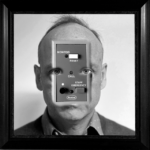
Example Randall Self-portrait (kinda scary one)
You must create an original Photoshop image for the front and back covers of the magazine. The title of the magazine is yours to name the only requirement being the inclusion of the following text on the front or back cover.
- Your name
- Art253 Digital Imaging
- Keene State College Art & Design
- Spring 2026
This information may be huge or tiny or in between but it must be readable.
Contents
- You must include all your projects for the semester. You may include new work or aborted projects as you wish.
- Include a spell-checked reflection paragraph in the first spead
- The projects in the magazine must be in the order assigned.
- Each project will include a small label indicating which project it was.
- The booklet will be a minimum of 16 pages but may include 20 if necessary.
- It cannot be 17, 18, or 19 pages as it must be a multiple of four pages (16, 20, 24)
Image Tutorial
One of the most mysterious aspect of InDesign is how to resize images.
Due Thursday, April 23
- All your class files organized on a drive or DropBox
- Download the template and open it up.
- Three proposed titles for your magazine with some ideas as to how it relates to the work you have done.
- Start bringing in images if you know how.
InDesign Workshop in Class
Due Tuesday, April 28
01
Initial Drafts of your Beyond Reality Cover Portrait
Export as JPG — Upload to DropBox
Name: lastname_portrait.jpg
02
Initial Draft of Final Magazine Document with Work Placed and rough design — Export as PDF and upload to DropBox
03
Work in class
Due Thursday, April 25
Booklet Workshop in ClassUpload your booklet before class to assemble in class.
Big Prints shuts down from 4-6pm so it is important that you export your print file and get it printed before then. Use the same computer you set up the Acrobat preferences on in class Tuesday. These tutorials will help you export the postscript file (.ps) from InDesign to turn into a PDF in Acrobat.
Final Exam Day
1-3PM, Tuesday, May 5
01
Final Archive in your shared folder on Dropbox.
02
Final assembled magazine due.
Digital Imaging Final Image Booklet
Instructions for printing
First two pages of booklet PDF
11 x 17″
card stock
100% size (not “fit to page”)
double sided
The rest of the pages
11 x 17″
plain paper
100% size (not “fit to page”)
double sided
Your booklets must be printed before class.
We will be meeting from 1-3pm on May 5 so bring your final Digital Imaging Booklet.