- Ê
- Â
fRandall has 61 post(s)
B Anatomy of the Letter
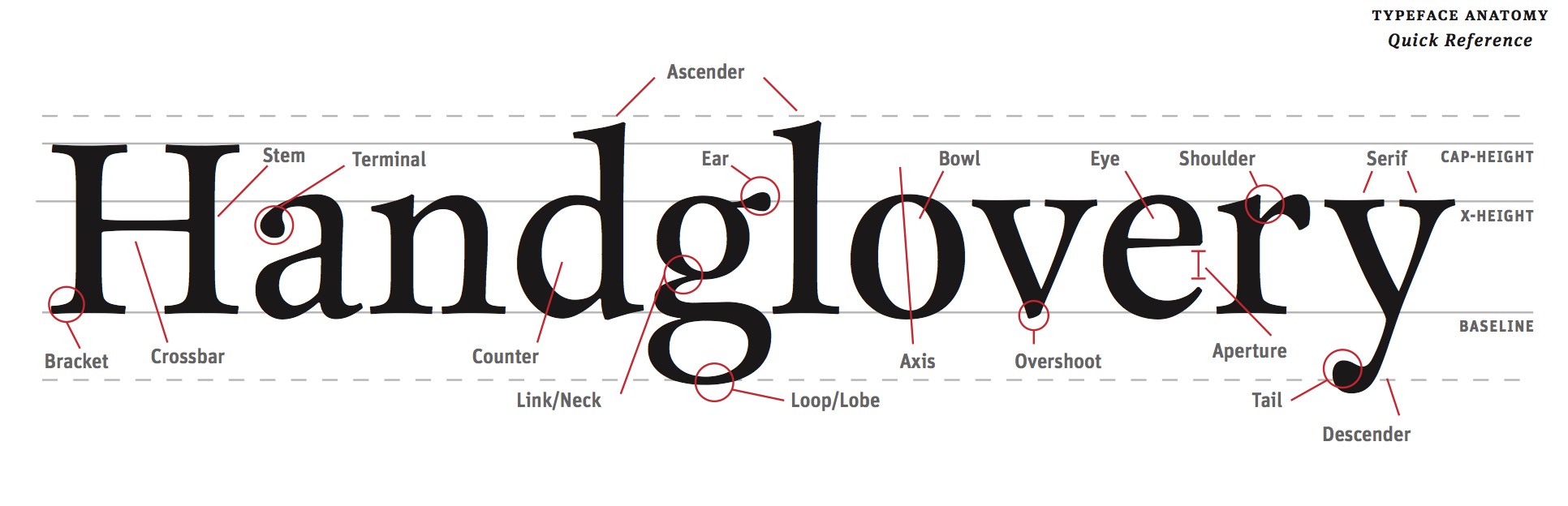
Read
Read this guide about identifying the parts of letter forms.
Study
Download and fill out this sheet. You will be quizzed on it.
Leave a Reply Cancel reply
You must be logged in to post a comment.
í Two Letters
Two Letters
Using only two letters create a series of dynamic typographic compositions. There are many forms these compositions can take. Experiment with large and small letters, combining similar forms, contrasting very different letter forms. Ultimately your goal is to create beautiful and dynamic form by playing with letterforms.
What is flow?
As a designer one of your jobs is to control the attention of the viewer. By the design choices you make, you guide the viewer around the page. Your compositions will naturally have a flow to them. The viewer will start looking at something on the page and her eyes will move around the composition before coming to rest on a focal point. As a designer you have some influence over this process. Create compositions that activate the gaze and delight the eye.
Your objective with this assignment is to:
- Understand how shapes interact to produce foreground and background relationships.
- Learn how to manipulate letterforms using Illustrator
- Create dramatic and dynamic visual compostions.
Rules of the Game
- You may only use two letters per composition.
- You make only use Garamond, Baskerville, Didot, Century, Helvetica.
- You may only scale and rotate.
- Do NOT stretch any letters.
- Both letters must be black on a white background.
- All work must be printed on a laser printer
- All work must be trimmed to size (6″x6″)
- You may use UPPERCASE or lowercase or a mixture of the two.
- You may use only the regular (not bold) and italic fonts of your typeface.
Make 25 Compositions
Make 25 6″x 6″ compositions in Illustrator using any two letters from the five class typefaces: Garamond, Baskerville, Didot, Clarendon, Helvetica. You can use as many different pairs of two letters that you wish. The letter pairs do not have to be the same, but you must use two different letters for each composition.
- Do 5 using two letters from Garamond
- Do 5 using two letters from Baskerville
- Do 5 using two letters from Didot
- Do 5 using two letters from Clarendon
- Do 5 using two letters from Helvetica
Think small / large / contrast / asymmetry / space / drama / focus / flow
Format: 6″ x 6″ trimmed
Output: Laser (no inkjet)
Printing
Each 6″x6″ square must be printed and trimmed to the exact size using crop marks. When you print DO NOT use the “Fit to Screen” function located in the print dialog. I usually generate a PDF and print from Acrobat. All work must be submitted in an manilla envelope with your name in the top right corner. Folded and dog-eared work will not be accepted.
Due Monday, September 21
1. One PDF with 25 compositions on DropBox in your your folder/03_two_letters/lastname_twoletters.pdf
2. Choose ten of the most diverse compositions and print and trim to 6″ x 6″ ready to hand in.
Leave a Reply Cancel reply
You must be logged in to post a comment.
B Manilla Envelope
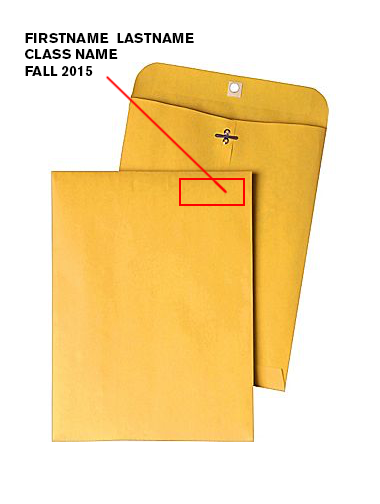
1. Get a 9″ x 12″ manilla envelope. (You will likely need 3 or 4.)
2. Write the following neatly in top right corner of the front of the envelope.
3. Write your first name last name on one line.
4. Write the name of your class on the second line.
5. Write “Fall 2015” on the third line.
6. Legibly write the name of the tool on the back in pencil
7. Insert work neatly inserted inside.
Leave a Reply Cancel reply
You must be logged in to post a comment.
B Printing with Crop Marks in Illustrator
1. Press ⌘ + P
(you don’t have time to mouse the menus…)
2. In the print dialog box select your paper size. This is usually US Letter (8.5″ x 11″).
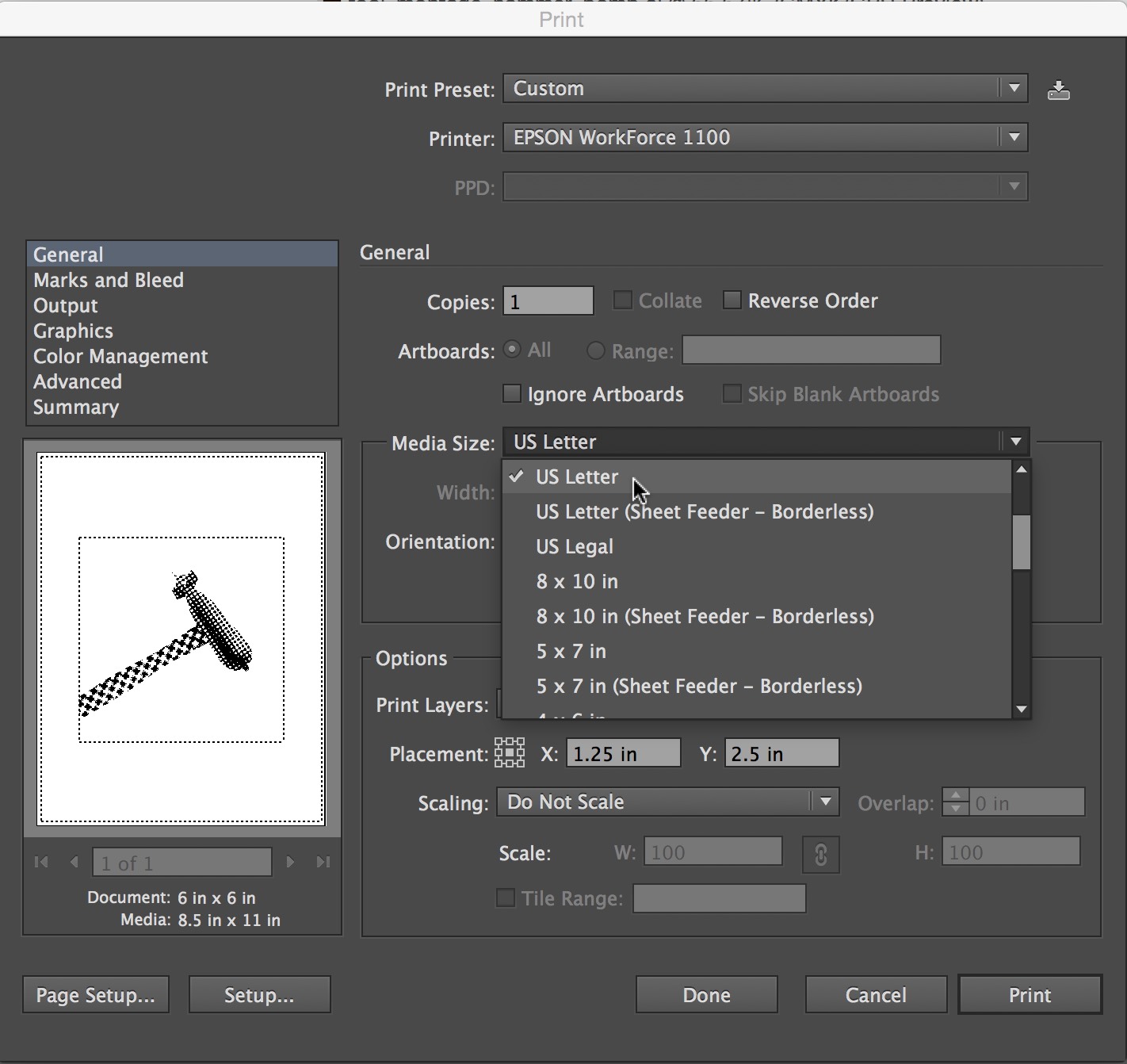
3. Select Do Not Scale from the “Scaling” menu.
4. Select “Marks and Bleed” from the top left menu list as shown.
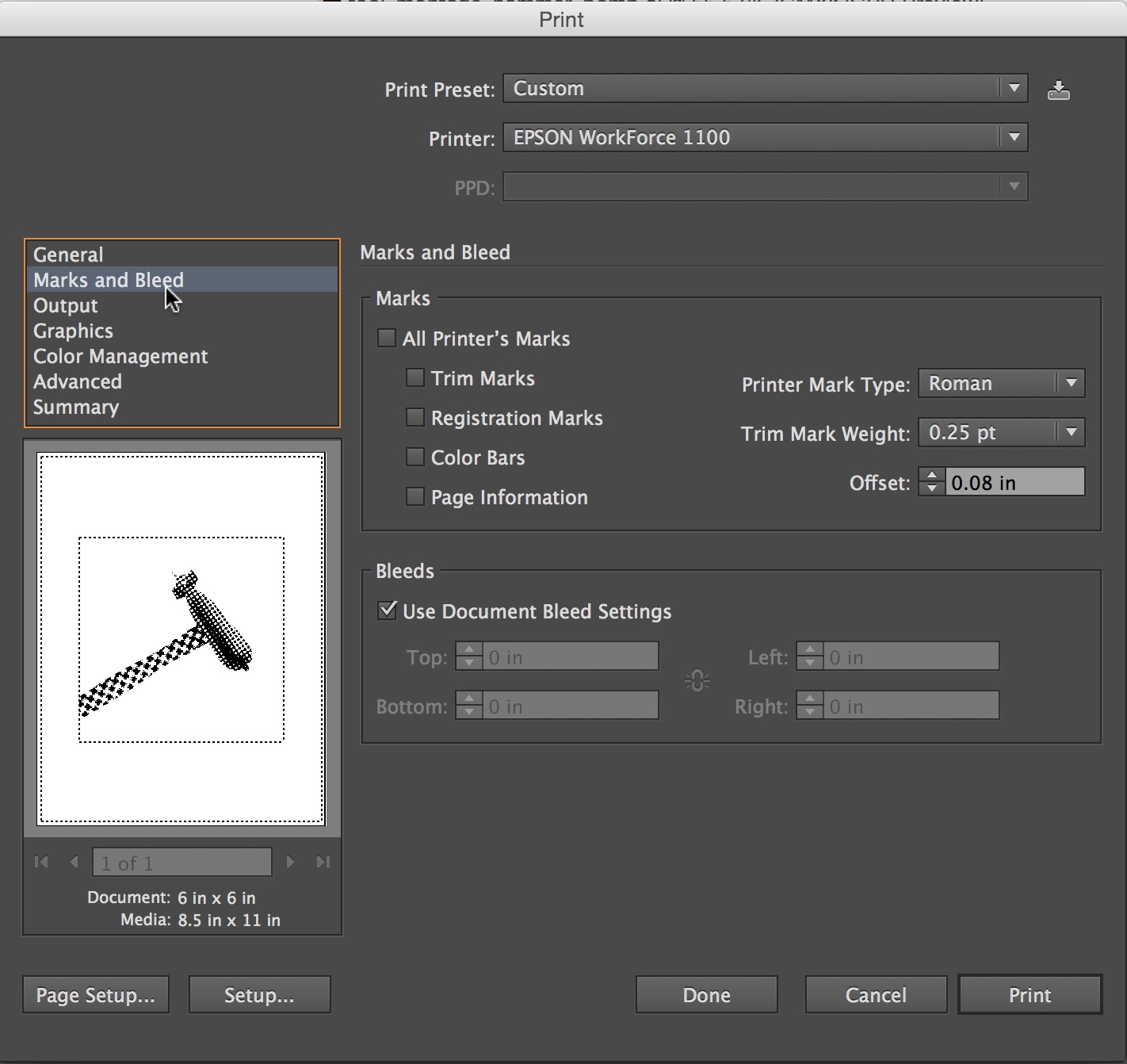
5. Check “Trim Marks” 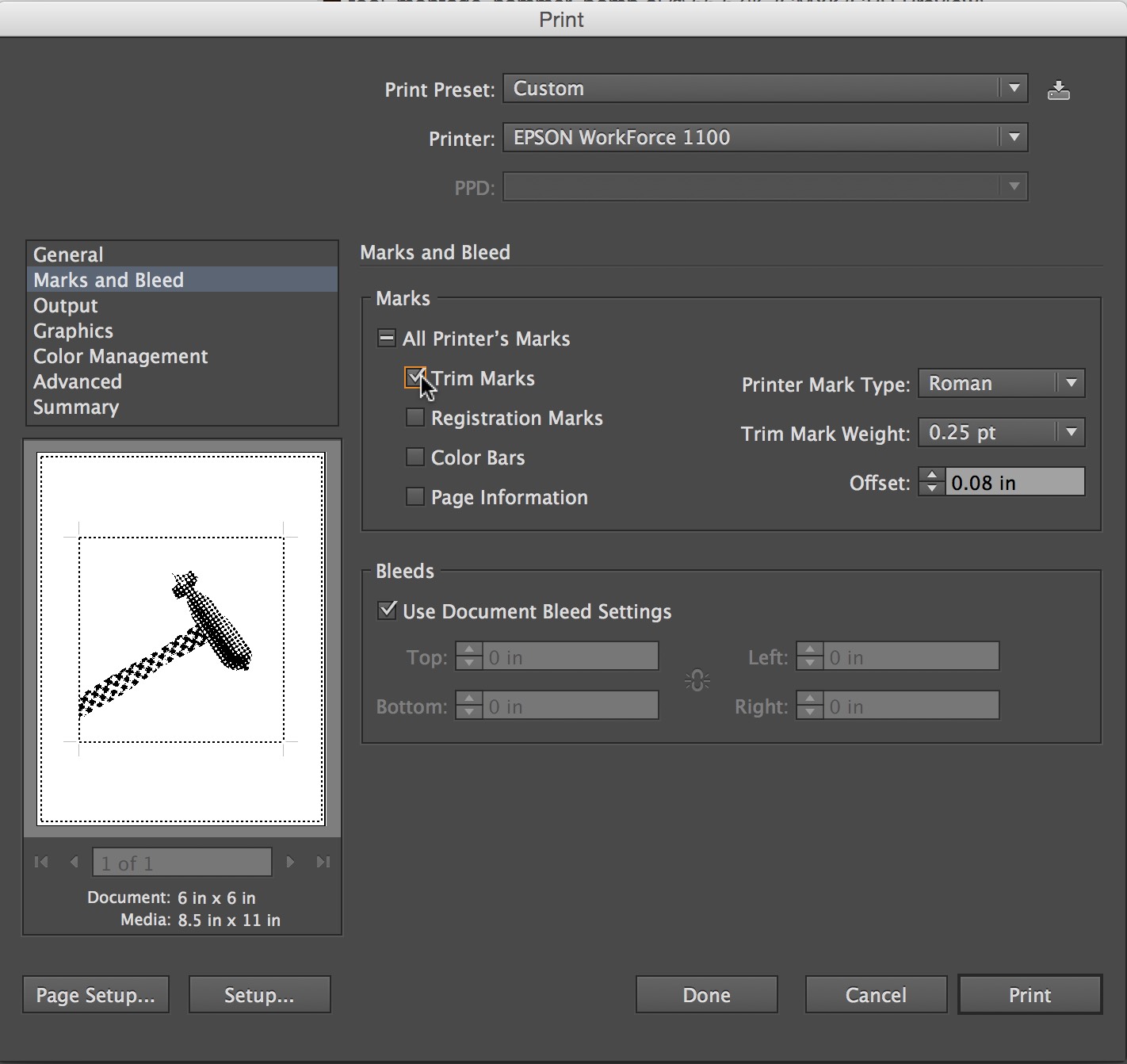
6. Press the Print button in the lower right corner.
Leave a Reply Cancel reply
You must be logged in to post a comment.
B The Five Classic Typefaces
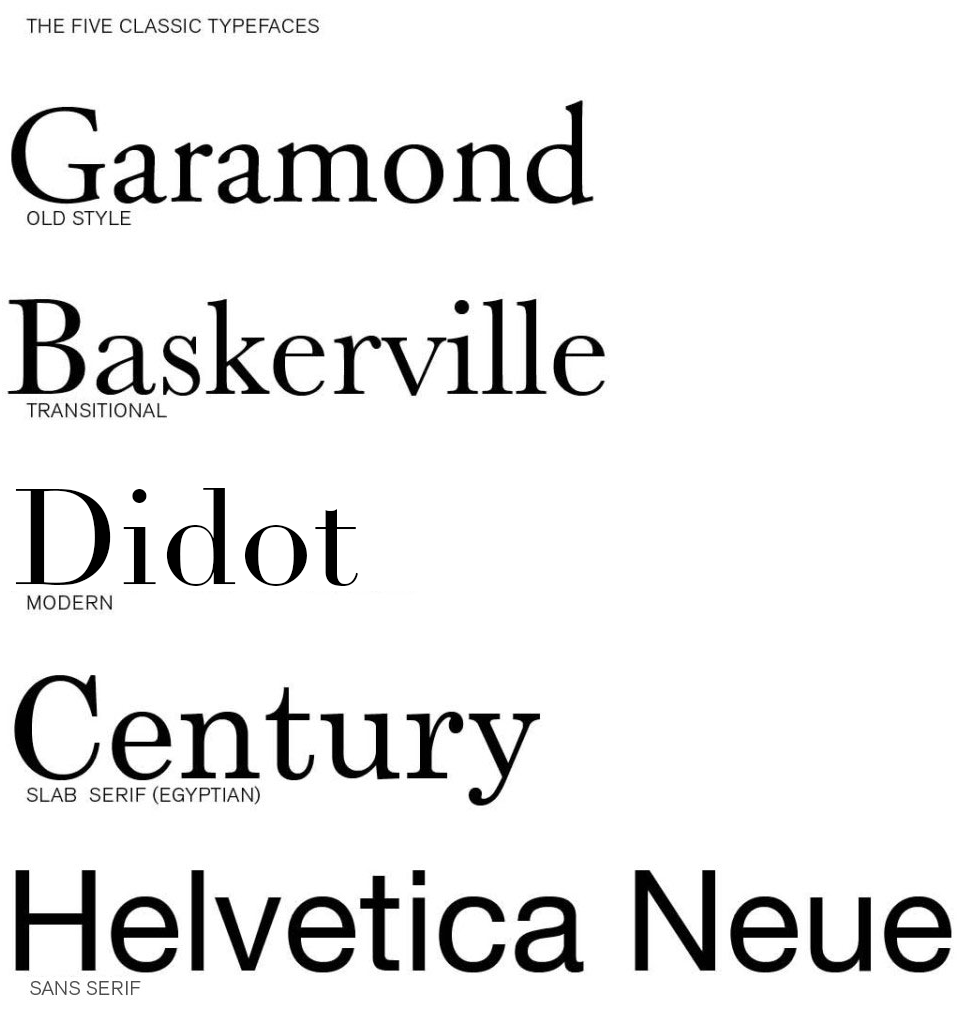
Download the Five Classic Typefaces Here…Five_Classic_Typefaces
Read
Explore these Links.
Designing with Type 5: Identifying Typefaces
The Five Classic Typefaces | Steve Bowden: Endicott SP13
A Simple Overview of the 5 Classic Typefaces
Read them and respond as a comment to this post.
Tell compare two of the typefaces: one you like and one you like less. Explain why they are different and what informs your opinion. It is not good enough to say “I just like it”. Be specific about the type attributes.
28 responses to “The Five Classic Typefaces”
Leave a Reply Cancel reply
You must be logged in to post a comment.
í Tool Montage : Tools of the Near Future
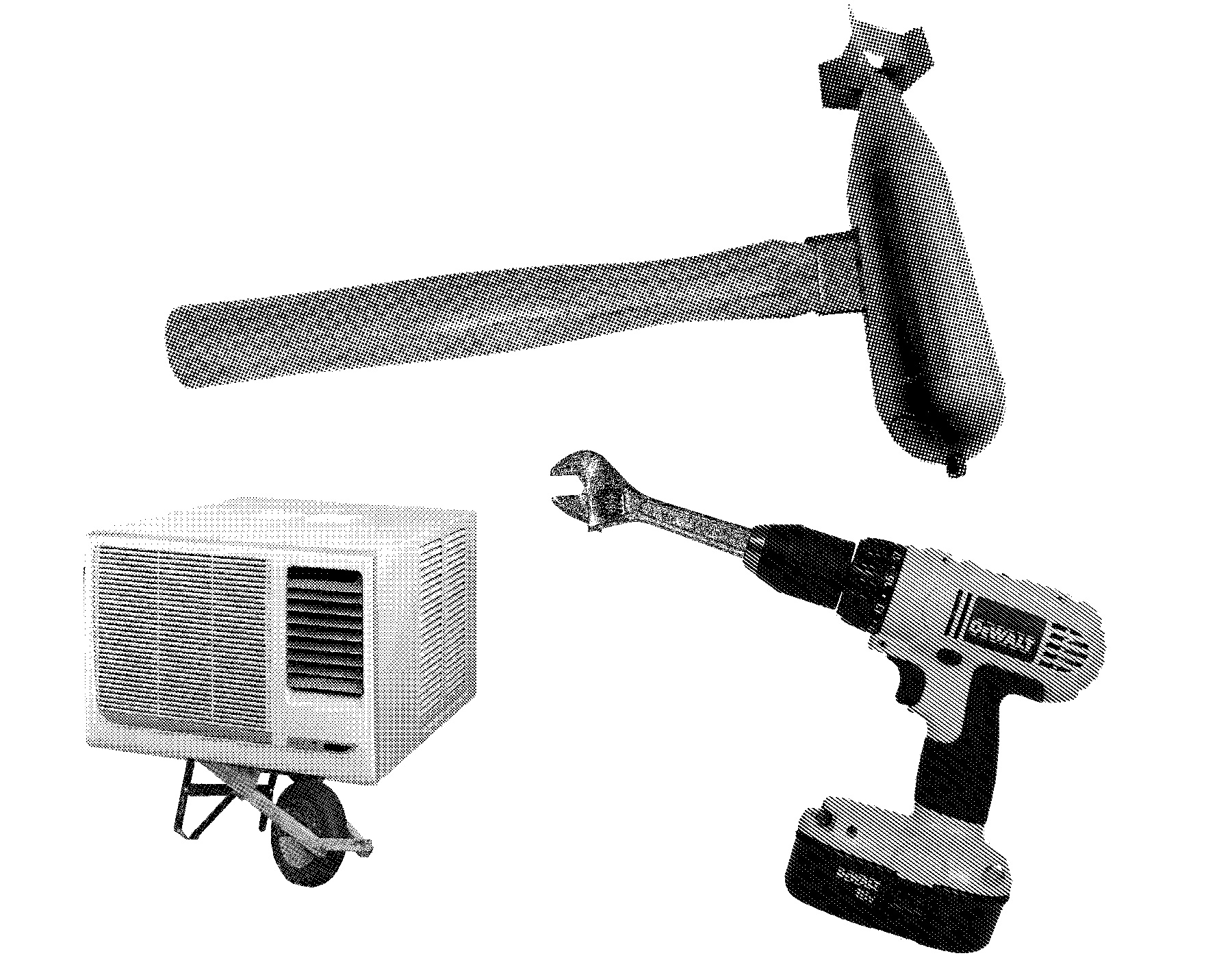
Design a series of 5 new “Tools of the Near Future” that solve problems that (may or may not yet) exist now. These tools should have plausible functions based in a specific context (for example: brushing your teeth while bike riding). The tool doesn’t have to be practical however and you are free to express implausibility and whimsy. Remember, this is about tools right? 🙂 Be prepared to answer these questions:
What problem does it solve?
How does it do it?
What is it called?
Build on your Previous Research
You can make tools from ideas you have already have or think up new ones. Go back to your Mind Maps to find new words and ways to look at the problem or make a new mind map to get you thinking differently. Write down twenty more tool pairings.
Make Thumbnails for 10 ideas
Select 10 of those tool pairings to explore with thumbnails. Make 3 sketches of each of your 10 tool combination ideas. You will have 30 sketches, or three sheets when you are done. Each sketch must be a completely different idea from the last one. Use different angles of tools for variety.
Use this template for your thumbnails
Choose 5 Tools to Create
Select 5 Tool Combos from your 10 thumbnails and make them using PhotoShop bitmaps in the program Illustrator.
The steps to prepare the images are :
- Collect Images: For both tools in your tool pair hybrid you will need 3-5 images of each (different types & angles)
- Medium Size: Source images should be between 600-1500 pixels (not to small, not too big)
- Number of Source Images: For 5 tool combos you will need approximately 30 images. This means that 5 pairs comprised of 2 different tools = 10 unique tools to research. For each of the 10 you need 3 images of each = 30 source images.
- Choose wisely: Think about the ways that the tools can combine. Sure a flat side view works but can you use dynamic angles to create more interesting final images.
- Find Interesting images: The best tool images may need to be separated from the background. Some tools will be silhouetted already, but many of the interesting ones will not. Don’t be afraid to work a but to silhouette the tool.
- Turn the images into bitmaps using only HALFTONE functions (not dither or 50% threshold). Keep the dot patterns noticeable but not too chunky or fine. We want all the images to be able blend well so very course halftones and very fine ones won’t mix well.
- Create bitmap photoshop .PSD images for each of your source images and save them with names that informative : your initials + tool + dot pattern + .psd = RH_hammer_19round.psd
- Watch these tutorialsIsolating and Enhancing Images for BitmapThere are 25 minutes of instruction that will show you what you need to know.
Isolating and Enhancing Images to Make Bitmaps / Part 1
Isolating and Enhancing Images to Make Bitmaps / Part 2
- Bitmap Format: All images must be BITMAP and saved as .PSD.
- Separate in Folders: Save all Bitmaps separated from your source .JPG files from the web
- Name them Correctly: All shared images must be prefixed with your initials…”RH_hammer_19round.psd”
- Upload and Share: Create a folder for yourself on DropBox in “GD_2015FALL” and upload your bitmap photoshop (.PSD) images to “GD_2015FALL / GD Tool Bitmaps / [ last – first ]”
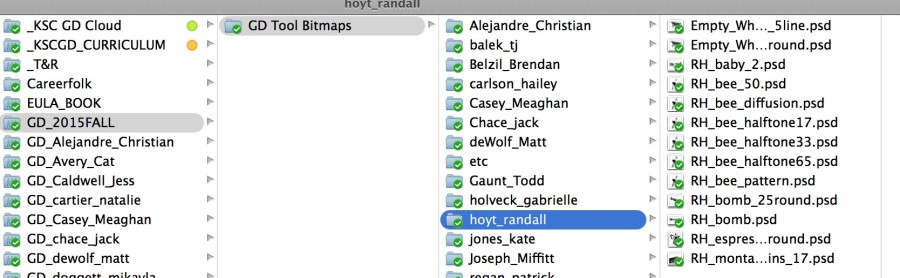
Build your Tools of the Near Future in Illustrator.
- Create a new illustrator file that is 6″ x 6″
- Import your images using: command + shift + ‘p’ / DO NOT DRAG AND DROP…
- Combine the images in creative ways. There should be only two images combined, but you may repeat one if necessary.Clipping Paths for Bitmaps in Illustrator
- Use the Menu : Objects > Clipping Mask > Make to hide parts of your images.
- You will need two (or more) variations of each of the future tools. Combine the tools in different ways or use different images to express the idea.
- Make a folder called “02_Future Tool” in your own Personal DropBox for your final illustrator Tool Montages.
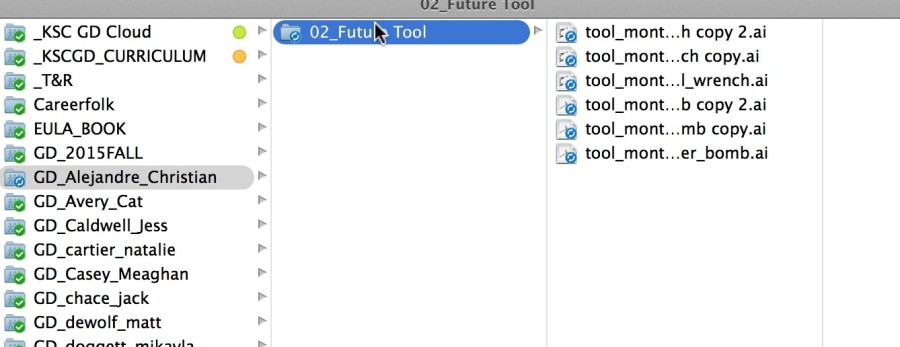
- Save all Illustrator files as .PDF (not .ai)
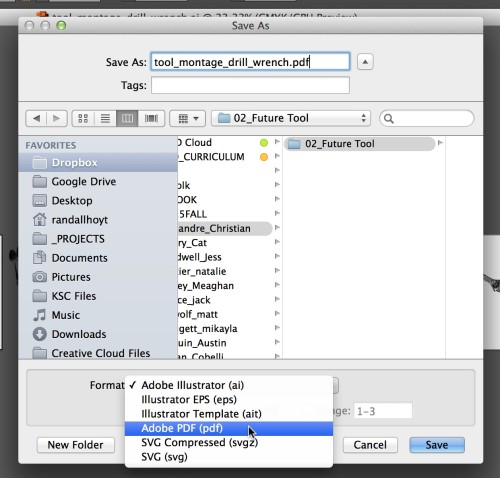
Have fun and ask questions if you have them.
Due Monday, Sepetember 9
- Thumbnails for 10 tool pairings ready to hand in (photocopy from sketchbooks if necessary)
- 5 PDFs with 2-3 versions of each future tool saved in a folder called “02_Future Tools” in your own Personal DropBox.
- 5 more Future Tools created with classmates images saved as PDF in “02_Future Tools” in your own Personal DropBox.
- All tool bitmap files saved in your folder on DropBox: GD_2015FALL / GD Tool Bitmaps / [ last – first ]
Leave a Reply Cancel reply
You must be logged in to post a comment.
S Isolating and Enhancing Images to Make Bitmaps
Isolating and Enhancing Images to Make Bitmaps / Part 1
Isolating and Enhancing Images to Make Bitmaps / Part 2
Clipping Paths for Bitmaps in Illustrator
Leave a Reply Cancel reply
You must be logged in to post a comment.

My Response
I thought this was a very fun and enjoyable project that was also helpful and educational on the creative/invention process. As I have never done a mind map before, I was surprised by how many great ideas can actually come out of them. I enjoyed getting together with my group members for the mind map. It was fun to see how different minds can think of totally different things when they hear a word and still work together and be as imaginative as possible.
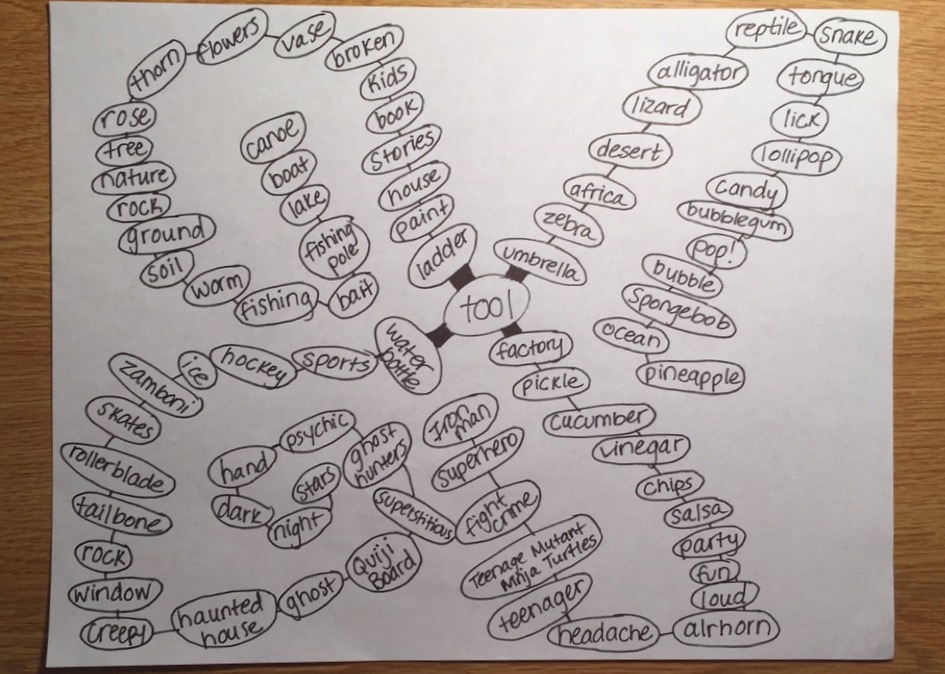
My Mind Map
25 Pairs
- Snake + Vase
- Rose + Umbrella
- Zebra + Bubblegum
- Hand + Ice
- Lizard + Lollipop
- Loud + Quiji board
- Dentures + Makeup
- Penny + Lipstick
- Piñata + Garden
- Snowman + Wine glass
- Mittens + Sweatpants
- Foam Finger + Water gun
- Rollercoaster + Music
- Bubblewrap + Car
- Haunted house + Party
- Book + Ladder
- Candy + Paint
- Salsa + Water Bottle
- Zamboni + Party
- Candy + Pickle
- Fishing pole + Tree
- Reptile + Airhorn
- Candy + Salsa
- Boat + Party
- Hand + Airhorn
My 10 Choices
- Snake + Vase: A stylish vase for reptile lovers to hold their flowers made of perhaps snake skin pattern or maybe an actual snake!
- Zebra + Bubblegum: My first thought was patterned gum. Our clothing, bags, scarves and accessories all have perhaps tribal, cheetah or even zebra print, why not our gum? Would someone be willing to spend extra few cents to have “pretty” gum as opposed to “regular” gum?
- Loud + Quiji Board: My first thought was a creepy voice that narrates whats happening on the board and maybe it will “hear” and “translate” some things that our human ears can’t just for extra spookiness. Maybe a speaking Quiji board could be helpful to any blind users as well?
- Snowman + Wine glass: We have chilled mugs for beer, why not a chilled wine glass that is also cute and winter-festive. I thought of a snowman doing a handstand would be the shape of a wine glass. Or perhaps an actual wine glass made out of snow or ice?
- Mittens + Sweatpants: I thought of cold nights when you don’t want to take your hands out of your sweatpants pockets. So what if in each pocket was a mitten with a string attached so you can keep your hands warms and never loose your mittens/gloves!
- Foam finger + Watere gun: How much fun would a sports game be if you could cheer on your team with your #1 foam finger and at the same time squirt some playful water at your opponents fans? It would keep your kids entertained for longer as well!
- Rollercoaster + Music: A lot of people resort to music when they are feeling anxious or scared or sad. These feelings can definitely come up on a roller coaster so what if a little music selection was offered as you ride to your death and it streamed through the bars over your shoulders.
- Candy + Paint: We have rock candy, candy cigarettes, insect candy, why not add another misleading candy to the list and make a little can of “paint” that is actually a sugary/syrupy liquid that kids can “paint” on their tongues with the “paintbrush” included.
- Candy + Salsa: My first thought was salsa being a mixture of various vegetables so what if there was a jelly bean, m & m, licorice, with a batter/ dough type substance as the base.
- Hand + Airhorn: A small, but effective hand held airhorn that is made to fit the mold of one hand making a fist.
Thumbnails
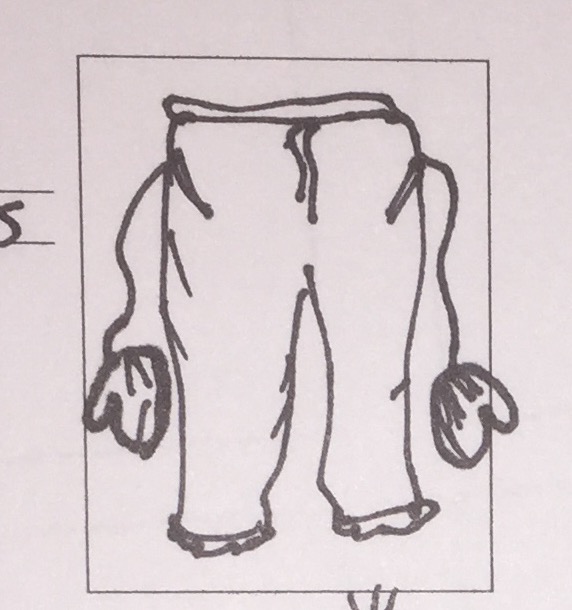
(Mittens + Sweatpants)
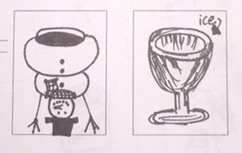
(Wine glass + Snowman)
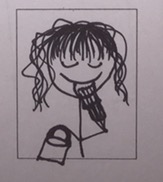
(Candy + Paint)
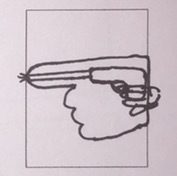
(Foam finger + Water gun)
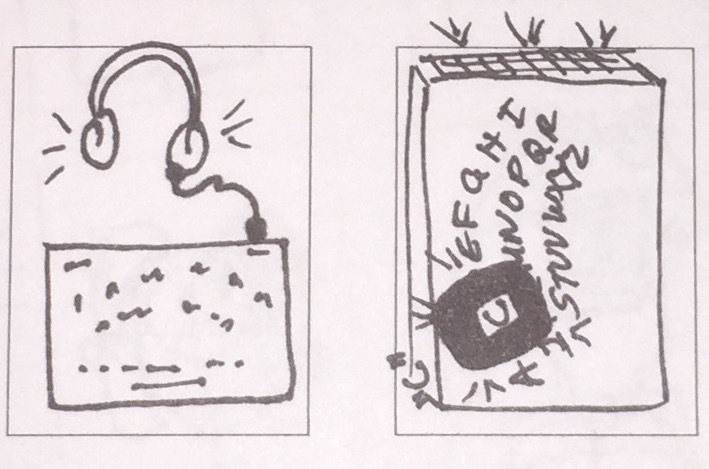
(Loud + Ouija board)
í Tools Mind Map

Combine two different types of tools together into one image using a forced connection.
Create images that are as seamless as possible. Design 10 unique and compelling tool montage compositions.
Mind Map a Lot of Ideas
Create three mind maps on the subject of TOOLS with your classmates. Read about Mind Maps in the Graphic Design Thinking Book on page 22.
1
The mind maps should be on 8.5×11″ white unlined paper.
2
Use a strong thin black marker.
3
Write clearly and legibly.
4
Draw lines in between ideas.
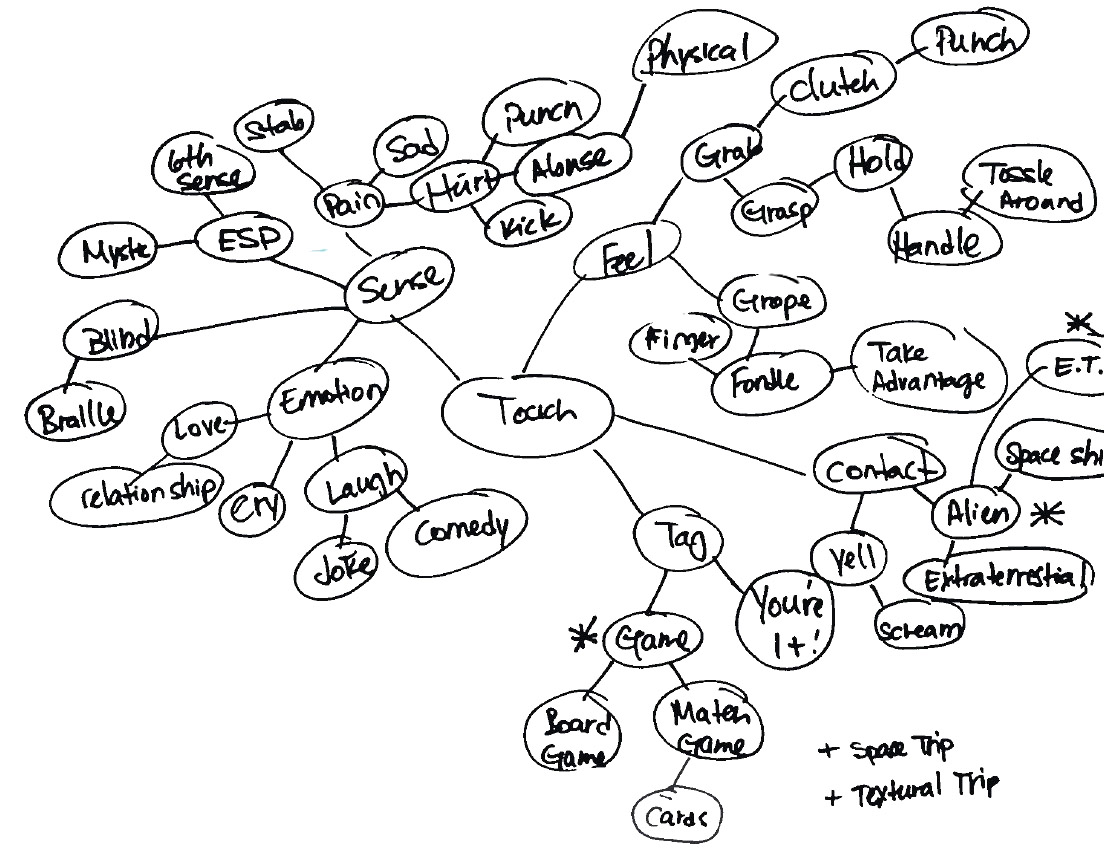
Combine
Make 25 incongruous pairings of tool names. The stranger and more interesting the better. Choose words that evoke images or ideas in your mind. Use these words to search for images and to inspire your ideas. You may use a tool or one in two different pairings if necessary. Write down these twenty tool pairings.
Select
Select 10 of those pairings to explore with thumbnails. Make 3 sketches of each of your 10 tool combination ideas. You will have 30 sketches, or three sheets when you are done. Each sketch must be a completely different idea from the last one. Use different angles of tools for variety.
Image Research
While you are sketching it may be helpful to see images of the tools you are drawing. Collect 3-5 images for each tool. Put them a separate folder for each pair to organize them. You will need to collect around 60-80 images. Don’t worry, it will not take long. Consider using specific search terms “ball hammer”, or “ww2 bomb” instead of just ‘bomb’.
Read
Read about Forced Connections in GD Thinking…

GD Thinking / Forced Connections
Due Wednesday, Sepetember 9
- 3 Mind Maps per group. Each member should Photodocument them to use in your personal research.
- Do 3 thumbnails for each tool pair (three sheets of thumbnails)
- An organized collection of research images for each of your tool combinations.
- A web post documenting your research.
(categorized as “Tool Montage Post”) The purpose of this post is to encapsulate your research and preserve it for the course. Include the following:
> A few words about your response to this project.
> One of the mind maps from your group.
> Your 25 possible tool combinations as a list: 1. hammer + garden hose, etc
> your 10 choices and a sentence as to why this would be fun to do.
> A few of your best thumbnails. Not all of them. Just a sampling of the best ones. You can use this template to organize your drawings: tool_montage_thumbnails
You can shoot pictures of your thumbnails with your cell phone or camera. Shoot in good, even lighting. Re-shoot blurry shots please….
Image preparation
- Select 10 different pairs of tools.
- Search the web for clean, images of good resolution (800px – 2000px). Try to find iconic images that you can separate from the backgrounds.
- Make a new folder in your ’01_Future Tools’ folder called ‘source’. This is where you store original web images.
- Make a new folder called ‘bitmaps’. This is where you save the finished high-contrast .PSD files
- Open these images in photoshop and turn them into grayscale images.
- Resize the images using ‘image size’ to 300dpi at 100%. The minimum dimension should be 6-8 inches.
- Isolate the main object from the background by selecting around them with the Polygon or magnetic lasso tool.
- Press ‘command + J’ to create a new layer with just the selection
- Delete the background layer.
- Take care to create clean images. Clean up any stray details you don’t want with the eraser tool.
- Save the image as .PSD into a the ‘sources’ folder.
- Adjust the contrast using ‘Levels’ to ‘bump up’ the black. Make the image slightly darker than you might normally.
- Turn the image into a ‘bitmap’ using the ‘50% Threshold’ or ‘halftone’ filters.
- If the image is too washed out or too black do ‘command + z’, make adjustments with levels and re-bitmap it.
- It you can’t make the image readable and strong then choose a different image.
- When the image looks good then ‘save as…’ (don’t save over your grayscale image!) into a new folder called ‘bitmap’.
- Repeat this process for all images.
Image Montage
- Create a new illustrator document at 6″ x 6″
- Save the image into the main ’04_montage’ folder
- ‘Place’ the images (shift + command + P) into the document at the correct size.
- Position them into a compelling relationship that is a cultural commentary.
- Take care to make a dynamic and powerful composition. Do not fill the space. Use the white space effectively.
- Create a ‘clipping mask’ if necessary with the pen tool using the ‘object > clipping mask’ from the menu.
- Adjust the images and clipping masks as necessary.
- Create a new art board and build more images.
Due Monday, February 23
- Do 3 versions of each of the 10 montages using the same images.
- Choose the best one for each montage and print (10 total)
- Bring 10 dynamic, compelling image montages that create powerful incongruous meaning relationships.
- Printed, trimmed, ready to hang
- PDF with all 30 montages on DropBox
Leave a Reply Cancel reply
You must be logged in to post a comment.
B READ: GD Thinking Chapter 1
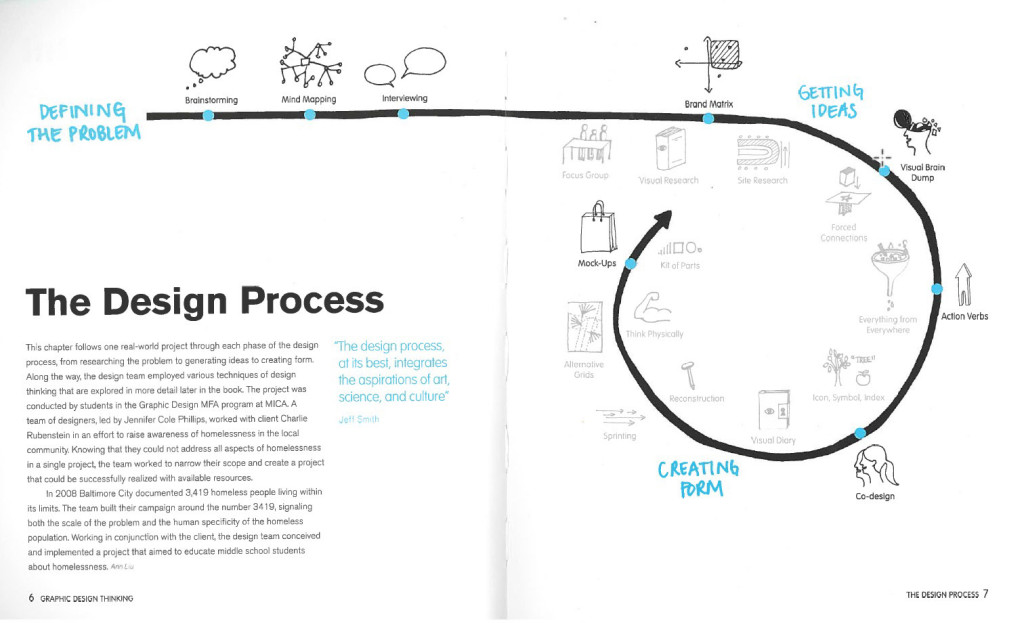
Read Pages 4-25
Use this PDF if you do not have the book yet: GD Thinking Chapter 1
What did you think of the ideas here? Choose a few different pages, concepts, or featured projects and post a quick comment right on this page (not a full post), just a paragraph of your reactions.
20 responses to “READ: GD Thinking Chapter 1”
-
Christian Alejandre says:
I personally found this section of the text to be pretty enlightening. There was a certain part that stood out to me the most (because I was guilty of this sort of thinking early on), and that was the part about the process of getting your ideas out onto paper in some way, shape or form. When I had first started to take design classes, I didn’t understand the reasons behind crazy brainstorming and drawing out thumbnails because I thought they were unnecessary and a waste of time. Just like the book, I thought, “can’t a creative person just sit down and be creative?”. I had the mentality that once I had settled an idea in my head I was sticking to it, that it was going to be my only option, and that everybody was going to love it as much as I did. Thankfully, over the years I’ve come to realize the benefits of getting everything out and exploring a multitude of different possibilities because limiting yourself is in no way beneficial. None of the courses I’ve taken previous to this class have gone too in-depth with brainstorming and mind-mapping though, so I’m excited to see how these different techniques work out for me in the long run.
-
Nick St. Amour says:
The first chapter was great start because it had shown me how to brainstorm for problems and solutions. I always had trouble thinking of ideas on the spot, but just like mind mapping the other ideas sounded wicked helpful. Focus Groups were cool because it’s just like surveying questions to the intended audience if your design is working or not. The Baltimarket case study was a great example which showed that you need to have a design that works for the people around the area and not just the designer. Without asking anybody in a focus group, how could you know that your design is actually working for what it was intended to do. You can even get greater new ideas that could work better from an audience member rather than thinking of ideas on your own. Another brainstorming idea that caught my attention was the visual research. I didn’t quiet think this was a type of research until I read this chapter. If you know what your design is going to be about you can look up images online and base your design off of different colors, textures, and patterns that are correlated to your research. Can’t wait to start using these brainstorming methods while designing in the future.
-
Julie Elwell says:
This reading was actually pretty eye-opening and interesting in the way that brainstorming can be so simple, but still get results from it. One particular example from the reading that caught my attention was how they used simple action words to act upon an idea. Though there was a consistent idea throughout each of the designs, each one was different and had unique qualities. The use of the words changed each design enough to give it a fresh perspective. I also liked the idea of group brainstorming because even though you may think you have the greatest idea, there’s always going to be someone who doesn’t like it or has an idea for something even better. Sharing your ideas with a group can help to broaden your own perspective and figure out the best solution to a problem. Even if you disagree with some ideas or think that they are boring or cliche, you can still take and build from those ideas by adding creative touches of your own or with the group. Either way, the group will walk away with a fresh new set of ideas to work with.
-
Meaghan Casey says:
I found this reading to be very interesting and rather shocking at the amount of work really goes into projects. You see things in everyday life and you never really realize how many people were behind this specific thing and how long it really took. I thought the 3419 project was very fascinating. I found it kind of crazy how many things they went through in order to get the message out to the public. When they gave the kits to the children to see what they might find “eye catching” or interesting, I never really thought of that before. Putting things out there and seeing what people really want to look at. Another thing in the chapter was the brainstorming and the different steps involved. I’ve never been amazing at brainstorming because I always think that the things I’m coming up with aren’t going to work. Its almost weird that I never thought of putting down dumb things because you never know, a great idea could come from it! Also giving a time limit when in a group, I think that’s a great idea. It keeps people motivated and more likely to come up with ideas quicker.
-
Julia Peet says:
The reading was very interactive. I love the way the book itself was designed. It does not feel like a textbook. It feels like a Graphic Design book. It is easy to follow and it pops in such a way that is lively and colorful. It teaches, but it also gives off this vibe that it has a story behind it.
I never realized how much work went into design. This book serves as a real eye-opener for just that reason. It talks about some of the concepts we’ve discussed in class, such as mind-mapping, but it also connects it to the real world. I never really knew that mind mapping was a widely used technique. The chapter serves to support the fact that there is so much more to graphic design than I originally thought. -
Bailey Rose says:
You can really tell that a bunch of graphic designers wrote this book. It’s very easy to understand and interesting. It’s rare to find a textbook that engages and connects with the world as smoothly and captivatingly as this one does. This reading was very enlightening and again, it proved to me that graphic design is much more complex than I had thought. I always thought brainstorming and the creative process was the least important part of art and design because I figured the idea would just come to you. I never realized the numerous techniques of boosting creativity that are out there and being used by actual graphic designers. I have never spent much time elaborating on my ideas or doing thumbnails or brain maps. This section has taught me that not only are all these things necessary but they are done by many, if not all graphic designers. It makes me think of the amount of work that goes into the ads and graphic art I see everyday that I didn’t even realize was a part of the process. I think having read this section I will take brainstorming and rough drafts such as thumbnails and sketches much more seriously and I am excited to see where that leads me in futures projects.
-
Matt deWolf says:
I like the fact that this book about graphic design is a work of graphic design. Its more visually pleasing than say a text book that could contain some of the same information. I also like the case studies, as they are an effective way to show real world application of the way ideas are born. I appreciate the fact that there is a break down of how to brainstorm. There is the normal way to think about it, as in just trying to come up with ideas, then there is the mind map. Its reassuring that you can literally write down anything and it doesn’t matter how far out the idea is from the subject matter. What stuck with me was that working in groups seems to be the best way to come up with the best ideas.
-
Christina Lyons says:
I really enjoyed reading this chapter, since it talks about the creative process. There are so many ways to tackle a concept, but this book really breaks it down well. You not only can use these concepts for just graphic design! The image the book uses on page 7 shows the process of an idea in graphic design. In all of the art classes I’ve taken there has always been a visual brain dump done (my favorite portion of the process personally). I really like how the book takes a single project done and it takes the reader step by step, without getting too overwhelming. This book is really going to be a great tool since it has these excellent visuals. I’m still a beginner to graphic design and this book has already taught me greatly on the creative process done, because quite frankly I was unsure of how it was done! I also enjoyed that the
3419 project the book uses as an example was a collaborative effort, just like the Tool Montages we have worked on. -
Courtney Sheehy says:
The ideas in this book gives me a new perspective on how to tackle graphic design, and simply designing in general. Page 10, explained how to create an action word into an object and the thickness, stretching and other ways to manipulate your message. Also page 15, described how every designer starts with a problem; for instances, improving a design, creating a logo ect. This offers me a new way in approaching “problems” throughout my graphic design career.
-
Brendan Belzil says:
I really enjoyed the layout and design of the images on pages 6-7 and how they seem to be hand drawn to really give a good understanding of the design process. The text goes on to give a better understanding of the visual concepts giving examples such as the homeless awareness project where a team of designers had to go through an extenuating design process of creating problems and solving them. I also enjoy how the book highlights key segments in blue and explains them into further detail on the side of the page. The brainstorming techniques that the book gives examples of are very helpful and seem to be used a lot in today’s graphic design world.
-
Gabrielle Holveck says:
I really liked how they chose one project and stuck with it throughout the chapter so the readers could see it go through the entire process start to finish. It really showed how something so small and simple and grow into this large scale project after just producing a few ideas. Personally I’m a visual learner so I enjoyed all of the graphics on each page that showed different ways of thinking such as the action verbs and brain dumping on page 10. I also really liked the book’s version of mind mapping and how it included pictures as well as words and different colors. This chapter showed how much work and ideas and also scrapped ideas that go into projects and what it takes to be a designer.
-
Jess Caldwell says:
This book is very interesting and visual. I think by being so visual it actually helps to explain and display ideas easier. On page 10 it talked about “Getting Ideas”. I thought it was really cool to see artist take the same object and re-creating many different ways. I usually find some difficulty in coming up with one idea, let alone eleven. I thought the Brainstorming article on page 16 to be rather helpful. It gives you step by step instructions on how to brainstorm correctly. It was also intriguing to see the pictures of the different mind maps people have done and how they approach it differently either with just text or drawings with text. Also how many ideas they could come up with with just a single topic. I think mind maps can be very helpful and fun to do.
-
Dylan Cobelli says:
This is a pretty interesting look at some of the work that graphic designers do. I especially liked the page that showed the back and forth conversation between a graphic designer and a client. It was a good to mention how a client may not always know exactly the best way to shape their ideas and that a graphic designer should be open to and acknowledging of other possible routes the design could take. The part about the origin of brainstorming and how it actually refers to overwhelming a problem with a variety of different ideas was a nifty fact.
-
> Jamie Halloran says:
After reading this chapter, it made me think more about the way I start my design process. I found it to be very helpful and insightful on helping me improve my design skills. Every time I would work on a project I would brainstorm ideas, but I never thought of how important it really is in the design process. In the reading, page 10 and 11 really caught my attention. It talked about the different designs that were created from just brainstorming ideas. I started to realize that brainstorming and mind mapping ideas is the foundation of it all to start the magic. I liked the example of the mind map on page 22. Having the maps have colorful and cool pictures to go with the words makes the process of brainstorming more interesting. I wouldn’t mind trying that more when I create a mind map next time.
-
Kate Jones says:
After reading this chapter I noticed the design precess a graphic designer goes through for every project their involved in is much more extensive than one would originally think. The first quote in the chapter is “The design process at it’s best, integrates the aspirations of art, science, and culture” -Jeff Smith. This quote suggests that graphic designers are so much more than just artists, they’re problem solvers that not only have to makes something aesthetically appealing but effective and sensible as well. The process involves many steps. At first the designer must define the problem, then they need to brainstorm; which they can use techniques such as mind mapping and even interviewing. Mind mapping is a form of mental research where a designer will start with a central term/idea then quickly and efficiently write out associated concepts and images. After thorough brainstorming the designer is able to get ideas and eventually create form, which allows them to experiment with mock-ups and choose the best version. This ongoing process was seen in the example of the 3419 campaign ( a project that aimed to educate middle school students about homelessness, where students were given a kit to create their own pillowcase posters). This chapter excited me about the process of graphic design because there are so many in-depth and exciting steps to reach a final product.
-
Danielle Vizard says:
In this chapter I had learned a lot about all the work that goes into graphic design, and it is way more than I have ever even considered. Each project take up so much thought, concentration and time. On the streets or in your home or even the store, no one even takes the time to look and examine the design of something on a box or whatever it is they are looking at. It just goes to show how under appreciated graphic designers work is.
This chapter gives me a good understanding on how people make brainstorming seem way more difficult than it is. Personally I used to hate brainstorming because I always felt pressured to have a list out but I had no idea what to write down. I tend to be bad under pressure. But I learned that as a graphic designer I’m going to have to get used to it cause I will be graphic designing for a long time. Also there are so many ways to brainstorm, I’m interested on how each method is going to work for me.
-
Julia Hannan says:
After reading this chapter, I have found a new and different way to process a thought into a design. I love all the graphics within the book, as I am more of a visual learner, so it is great to see everything drawn out. I really liked the 3419 project and all the different mind-mapping tools they used, especially the brainstorming of can, want, and are on page 6. I also love the idea of a brain dump, and how everything you think of could be relevant to your project, even though it may not make sense while you are writing it down. How the authors of this textbook used the 3419 project throughout part of the chapter was very interesting as well. I also never realized how many designers went into a single project. So much time is spent on a single campaign. This text is an eyeopener and I will definitely be looking at logos and other various signs with more appreciation.
-
Mikayla Doggett says:
I thought it was interesting that the book said “Brainstorming quickly became a popular way to help people think creatively-even people who don’t consider themselves creative at all.” It also talked about how everyone has the ability to improve their creativity. This inspired me. Often times I feel like I’m not improving at all, but this section gave me hope that I can improve as a designer. I had no idea how much work can go into one project. The ideas of multiple people are often better than one person. It provides a broader view and can provide the client with a better final result. I found mind mapping interesting. Since a problem can take a long time to figure out a solution to, it’s important to get good ideas quickly. Mind mapping allows you to explore your own mind while getting ideas fast. It is an interesting way to brainstorm.
-
Joseph Sullivan says:
To the naked eye, graphic design may seem to be taken for granted. Most graphic designers go unrecognized their whole life and this chapter really demonstrates why designers deserve more credit than they get. Graphic design is a very demanding medium and this specific section of the book really outlines how much work really goes into this art form. I found it interesting when the book discussed the collaboration aspect of design because even I personally considered graphic design to be more of an independent career. I thought it was a good chapter to read especially before mind mapping in class as a group, because it got me to accept the fact that using multiple brains is important before actually having to implement this skill in real life.
-
Austin Drouin says:
I thoroughly enjoyed the reading of this chapter as it is rare to find a college level “textbook” that engages so smoothly with its readers as well as with its subject matter. The chapter serves to prove that graphic design is a widely vast and creative career, which includes a lot of collaboration between members of a team. It also gave me an greater understanding and appreciation for the field of graphic design as its own form of an art. This chapter has encouraged my success and thrive for a greater education concerning the ideals of Graphic Design, and I’m excited to employ these skills into modern and current projects.
Leave a Reply Cancel reply
You must be logged in to post a comment.
-
-
Classroom
-
-
Recent Posts
Recent Comments
- Danielle Vizard on Thinking with Type — TEXT
- Danielle Vizard on Digging’ It!
- Jenna on Thinking with Type — TEXT
- Jenna on Digging’ It!
- Elizabeth Robinson on Digging’ It!
Archives
- November 2023
- August 2023
- May 2023
- April 2023
- March 2023
- February 2023
- January 2023
- December 2022
- November 2022
- October 2022
- September 2022
- August 2022
- July 2022
- June 2022
- May 2022
- February 2022
- December 2021
- November 2021
- October 2021
- September 2021
- August 2021
- June 2020
- February 2018
- December 2015
- November 2015
- October 2015
- September 2015
- August 2015
Categories
-
About
KSC GRAPHIC DESIGN


The two typefaces I’m comparing are Helvetica and Century. Out of the two, I prefer Century over Helvetica. Century has a more curvier, thinner style, as well as a better flow to it. Helvetica on the other hand is more blockier, bulkier, and bolder. It stands out of the crowd and shouts “look at me”! I chose Century because it has a very dainty feel to it compared to the other fonts. It reminds me of my own hand writing and something you would find on an important document. I didn’t like Helvetica that much because to me it seemed very plain. It just reminded me of any bold title you would see on every package at the grocery store (which is not a bad thing). I prefer interesting fonts that have a curvier sense to them. It gives them more “life”, like a person is writing it.
Century and Baskerville seem to be my favorites out of these classic typefaces. I say this because the look of century is so classic in itself, perhaps it’s called “century” since the roots of this type can be traced back for centuries! It’s a very unimposing font, as it’s easy on the eyes and the reader should have no problem focusing on each word. Baskerville is a bit different in this way as the font is more condensed. The letters seem to be much closer together and while I believe that this font looks very clean, I feel as though it is also possible that the smaller the font goes the more difficult it may be for some to focus on the letters. Overall however, this font does look very nice when utilized correctly.
My favorite of these fonts is Garamond. I like how the letters are all rounded and wispy, but they all have tails to them. I also like Century. I like the old style lettering because it looks like something you would find on an old newspaper clipping. They have an almost medieval appeal to them. I think it is because of the way the letters all have tails that are sharp and jagged. I don’t really like the Helvetia font because it is too bold and plain. There is too much simplicity to it that does not appeal to the eye. The Century font is soft and easy flowing while the Garamond is thinner and sharper.
I like the century font. It reminds me of a typewriter. It has character, but is still elegant. It seems like a font that can be used for multiple problems. This font seems sophisticated. I love the serif fonts. The letters seem to flow together well, creating a balanced composition. I did not like Helvetica. This font is overused. It is too main stream. The letters, unlike century, have very little character, which is probably why people are inclined to use it more often. When looking at Helvetica, it doesn’t catch the eye and is therefore less memorable. It isn’t an awful font. It’s modern and sleek, but I prefer the serif fonts. They seem older and more vintage.
I personally liked navigating through the designing with type website. I found that it was very user friendly and quite easy to get through all of the different tabs. The tabs also contained a lot of information that was easy to understand. Nothing was too technical or hard to navigate.
Baskerville is the font that I like best out of the bunch. It has a professional but relaxed look to it. I think this is attributed to the fact that it is a serif font that is thinner than Garamond. Helvetica is my least favorite font. It is too plain and over used. Although it is an easy font to read it has no surprise factor any more and elicits no emotion.
The two typefaces I chose to compare are Didot and Helvetica. Didot I chose as my favorite typeface. I actually used Didot quite a bit in my other classes. I really enjoy this typeface, because it has a modern, sleek look to it but also has a classic feel to it. Didot has a very stylish look to it with the varying thick and thinness in the letters. I love the top part of the lowercase “t” in Didot with that nice little curve on the top. Aesthetically, I find DIdot pleasing to my eye. My least favorite is Helvetica in this comparison of typefaces.
Personally, I think Helvetica just is so different compared to the other typefaces listed. It’s a very bold and simple look. Helvetica was used for functional purposes and to be put on signs. It was created in 1957 where typography was becoming more experimental. The other typefaces listed above are classic and were created in the 1500s and even 1800s. I just don’t like the look of Helvetica compared to these other typefaces, it’s a sans seriff fonts and all the others contain seriffs. It looks very jarring and harsh when set next to the other typefaces and stands out in an unpleasing way.
My favorite font is Garamond. It is very old fashioned and I like the style. It is very elegant looking along with simple at the same time. It looks like something you would see in a newspaper a long time ago or an old book! I love how the letters look, something about it is just satisfying to my eye.
I am nit a huge fan of the Helvetica font. It doesn’t do much for me. It is almost too simple and there isn’t much to it. It looks like you could take a sharpie and copy this font without even trying. One thing that is good about it, is how simple and practical it is. It is very clear and readable and I’m sure a lot of people like that. I prefer fonts that have more spunk to them and look like they have personality in each letter. Helvetica is too plain and bulky.
The two fonts that I find appealing are Transitional and Slab Serif (Egyptian). The Transitional lettering has more curvature and smoother flow that I find very attractive. However, the Slab Serif(Egyptian) has less curves and the text is more blunt and has more angles. It reminds me of texts that I see in magazines and books. The two fonts seem similar but have opposing differences.
The two fonts I like are Helvetica and Didot. I am a huge fan of Helvetica (especially after watching the documentary Helvetica). Helvetica is a swiss Sans serif typeface that was made in 1957. Im attracted to it’s slightly condensed letters and clean design because not only is it very readable, but to me it gets straight to the point. I like Didot as well but it’s not nearly as universal as Helvetica. Helvetica has the ability to be used to say so many different things. Didot, a modern typeface made in 1788 has a strong contrast between it’s thicks and thins, as well as a strong vertical stress. It was the first modern typeface among the older faces known as Old Style. What draws me to Didot is it’s bold expression that comes from it’s contrasting thick and thin lines.
The two fonts I have chose to compare are Helvetica and Century. I prefer Helvetica of the two because personally I enjoy more modern looking sans serif fonts that help broadcast futuristic looking media. All sans serif fonts are typically very smooth and simple while serif fonts are very contour and complex. Century would probably be my favorite out of the serif fonts if I wanted to reach more of a vintage or classic look. I would use both of these fonts in the future it just depends on the design and which direction it is going towards, modern or classic.
Didot and Baskerville are two very different fonts. Both are used for personal or design use, but I would prefer Didot over Garamond. Didot has such a bold and interesting look to it, it draws your attention to it. The thick and thin lines combine to create this effect, and I think it does a good job in grabbing my attention. On the other hand, Baskerville is a little harsh for me, and doesn’t seem to flow, like Didot does. I don’t think this font fits together well, It seems choppy and awkward to me. It doesn’t catch my eye as much as Didot or other fonts do. Both these fonts will get the job done, but I love the characteristic and feeling Didot creates.
Helvetica Neue and Garamond are the fonts most seperated by age, and it shows. As time passed, printing went from looking similar to pen and ink writing, to impossibly perfect lettering. I like Helvetica more than garamond because it’s a very common font and I prefer simple and easy to read fonts because I work on a computer programming so much. I really dislike garamond as a computer font, however I think it looks nice for books or as a decorative font, but its just less readable than helvetica. Garamond is a better font for real paper, while helvetica is a winner on the computer.
The font i took a strong liking to was Didot, while Century on the otherhand i didn’t like so much. I really like Didot’s heavy contrast between the thick and thins, it gives it a very fragile look. I also like how spaced out each of Didot’s letters appear, it makes it look like each letter stands out on its while still maintaining the cohesiveness needed for a flexible typeface. Century isn’t such a bad typefaces, there’s just a few little things about it that i personally don’t care for. I don’t like Century’s slab seriffs, it’s too distracting for me. Also i feel like the curves aren’t quite as interesting or varied as some of the other typefaces such as Garamond or Baskerville. Century probably has it’s uses, but i’d rather stick with Didot.
My favorite out of them is definitely Garamond because of it’s elegance compared to the rest of the types. I prefer the open and round letter forms because they make it seem like a friendly happier type rather than the other dull ones but it’s not too casual at the same time. My least favorite is Helvetica because it’s just boring straight letters with no elegance or excitement or anything. Garamond has the rounded edges whereas Helvetica is just cut straight and it may seem like a small detail but that small flair is much more appealing to me personally.
My favorite font out of these five type faces is Century because of its thick serifs and the over all curvy look of some of the letters, like the tail on the lower case ‘y’ for example, or the shoulder on the letter ‘r’. I like the natural boldness of the font along with its uppercase letters. It also is very legible.
My least favorite font out of these five is Didot because of its extreme thicks and thins of the horizontal and vertical lines. I think it would work well as a short heading, but as body text I think that the reader would get distracted by the extreme variation of the font itself.
Century and Baskerville fronts seem to be my favorite as of now because I like how fluent the letters are corresponding with one another. The terminals on the letters gives the font more of a dramatic and playful look. It is not as serious as Helvetica, which is very straight forward and cutting edge. Didot is probably my least favorite because I do not like how skinny the legs are and it looks too old modern fashion for me. I feel like it is a font that the elderly would enjoy using.
The two fonts I’ll be comparing are Didot and Garamound. Didot is the font I like the most, something about the symmetrical letters appeals to my eyes. Didot is a Rational Serif which contain super thin looking serifs with no curvy brackets. Garamound is the font I don’t enjoy out of the 5 different fonts. It’s a humanist serif which has humanistic brackets and mimics the looks of hand writing. This is nothing special because we see our own hand writing everyday. Didot just looks fancy which I can imagine seeing this font on a cover of a fashion magazine rather than Garmound which looks like the boring typeface cousin of the Harry Potter logo.
Helvetica Neue and Didot are very different fonts, but have a professional look to them in their own way. I believe Helvetica Neue could be used for just about any company, while Didot has that specific look that would be for a fashion company. I prefer Helvetica Neue because I like the simplicity of it and I believe you could use it as the title or the body of a page and it would be easy to read. Didot has more of a pen like quality that makes for a great title, but I believe it would not be legible if shrunken down as a body text.
My favorite typeface is Baskerville over Helvetica. Baskerville is much classier and feels more sophisticated to me than Helvetica, which seems very modern and unoriginal. I love Baskerville’s style and how it looks as if it is from the Roman times. It is not as hard as Helvetica, but is not soft and vulnerable. Helvetica is large and in charge with how its letters are designed. Helvetica is overrated to me because it is used so often for billboards and other company logos that it is seen everywhere. I believe Baskerville should be used more in expensive and classier brands, because it feels more exquisite.
Out of the five typefaces we use, Didot happens to be my favorite font. I enjoy looking at the cleaned lines of the sperifs. It gives off a clean lined look which i am attracted too. It gives off a neat and deliberate feeling when you look at this specific type face. Helvetica Neue falls just short of Didot for my personally preference. Helvetica is also a clean lined look. The letters are organized neatly; Also they look like “block” letters. Block letters remind me of posters that one would make for a car washes, garage sales, as well as sport posters, which brings back memories!
My two favorite fonts have to be Didot and Baskerville. They just really capture my attention, especially Didot with its thin flat serifs and how professional and classy Baskerville looks. They look like fonts you would use on like invitations or things you want to look clean and simple. I would have to say that Helvetica is my least favorite font, due to the reason that it looks elementary and boring with its bold, thick block lettering. Helvetica looks like the font you would use if you want to catch some ones attention such as a caution sign.
Out of the five classic typefaces, I would have to say that Didot is my favorite and Helvetica is my least favorite. I’m indifferent about the fonts in-between because of how similar they are in appearance. I don’t hate them but I don’t think they’re absolutely incredible. They’re just kind of there, and they work great for big blocks of body text.
As far as Didot goes, I love the modern look of it. It’s clean, elegant, and overall just aesthetically pleasing to the eye. It screams city to me. I can picture it gracing the opening titles of a movie (you know, when a song plays in the background and the camera pans over New York locations while text appears on the screen introducing the cast). I think the contrast between the thicks and the thins of the text really add something spectacular to it because of how severe they are. I also really enjoy the fact that it still looks good in uppercase, which is hard to find in some fonts. Sometimes I’ll find a font that I like in lowercase, but as soon as I make the switch to uppercase everything goes haywire and it looks like a completely different entity. That’s never fun.
The thing about Helvetica is that I don’t necessarily dislike it as a whole, I’m just not really a fan of the regular version of the font. I have seen many companies use the font as a base and alter it a bit, and I liked it in that case. I also really like Helvetica Light, which is just a variation of the same font. Something about the plain, regular Helvetica Neue is too dull for me. It’s straightforward and to the point. It’s a sans serif font. There just isn’t anything too fun about the plain black regular variation of the font on a white page unless something is done to liven it up, in my opinion. Thank God I have 4 other fonts to choose from for now, right?!
The five classic typefaces have a lot of similarities but many more differences. My favorite typeface I would say is Didot, I like this one the most because of how simple it is. I think this font is much more modern then the other ones and makes for a clean easy reading font. My least favorite typeface out of these five is Helvetica, its not that I don’t like Helvetica, it’s just my least favorite out of these five. I find this font to be more boring and just really pain. However this font is one of the most popular fonts and is used for everything everywhere.
Didot and Helvetica are very different from each other; Helvetica is much more of a plain, bold font very easy to read doesn’t have a lot of pizzazz to it, where I find Didot to have much more of an interesting type to it, its thin and I think it’s the way it’s more modern pulls me into it.
The two fonts I chose are Century and Didot. My favorite of the two is Century. They both have their own qualities and I could see myself using both for future projects, depending on what the word/message is or how I want it to be portrayed. I like century because it has an old or ancient feeling to it. It looks like the type of font that would be used to engrave words in an old town in Europe. The bracketed serifs are what gives it this feel, I think. Also the stable roundness to the letters. I like the way the stress in the letters is there but not as noticeable as in Didot. It looks a lot more natural and more like handwriting.
Having said that, Didot has some qualities that I like as well. Didot feels much more sleek and modern. Its obvious that it’s not supposed to look like handwriting or natural because of the sheriffs having no brackets to make it flow better, and the kerning is much further apart than natural handwriting. Didot and Century are similar in the way that they both have vertical stress. Other than that, however, they are very different.
Two typefaces to compare would be Didot and Baskerville. I prefer the font Didot because it is modern yet has a classical feel to it as well. I really like the variation of thickness and thinness about the letters. It catches my attention. For example the letters of capital O’s and D’s are very thin on the top and bottom but thick on the sides. There is just something appealing about that to me that captures my attention and draws me in.
I am not a huge fan of Baskerville font. I don’t like how the letters are very close and the letters seem too wide. For example, capital K, E, and L in Baskerville font are very wide for their x-height. Although, it is a font that can be easily read, it just isn’t one of my favorites.
My favorite font out of the five is most likely Helvetica. I really like how simple it is in terms of the lack of serifs, and I personally it always looks very clean. As someone with a small case of dyslexia, Helvetica is the easiest one to read for me because of the lack of serifs. In general, I think that San Serif fonts are the easiest to read, where as Old Style fonts are harder for me to read. Garamond is an Old Style font and it is much harder to read than Helvetica because of the heavy brackets, lack of even thickness and having very little contrast between thick and thins. I don’t think that it’s a bad looking font, I think that it works in certain cases, but it is definitely much harder to read than Helvetica.
My favorite fonts out of the five classic typefaces are both Helvetica and century, preferably I would choose Helvetica because its classic, simple, and bold design have led to some of our worlds most recognizable logos. Also I thoroughly enjoy this font because of its legibility to a greater and vastly diverse audience, the letters are clear and distraction free. The typeface I like the least has to be Garamond because I feel that even thought the letters are formed to replicate the forms of natural handwriting, I have found that it is often hard to read because of the heaviness and boldness of its little contrasted lines.
I would compare between Baskerville font with Century. Between the two typefaces, I like Baskerville. Among the list, I feel that the features and spacing leave the letters distinguished and lined up very well. Letters appear wholesome and dark, but elegant and curvy. Their roundness builds up the look of them and allows them to mesh well next to each other. Their axis is very vertical, doesn’t look very slanted at the same time.
The Didot typeface seems to flattened, and the thinness of the curves leave the letters not as distinguished, although they are farther apart between letters, they are still quite thin between major parts of each letter, Like the two ends of an uppercase ‘D’ or ‘O.’ It seems too kerned apart.